
#Quickstart
Wrap one risky call, run your code, and watch what Anvil would have caught in your dashboard. Ghost mode is on by default — nothing gets blocked until you say so — so this is safe to drop in wherever you already are.
The dashboard is where Anvil lives. One command in the terminal to wrap your first call, then everything after — verdicts, actions, flipping to enforce, adding more protection — happens in /app.
By the end of this page you'll have:
- Your dashboard open at /app, showing your first action and a live decision log
- Anvil watching a real call in your codebase, with the wrap already written for you
- A clear picture of what Anvil would have caught — in a UI, not a JSON dump
- A one-click path to flipping an action to enforce, when you're ready
#Before you start
- Your application is JavaScript or TypeScript, on Node. Anvil wraps JS/TS call sites. Python, Go, Ruby and Java are not supported yet, and Deno, Bun and edge runtimes are untested — tell us what you need.
- Node.js 20 or newer — required. Every command on this page starts with npx, and npx ships inside Node.js. If you don't have Node installed, the command below doesn't fail with an Anvil error — your terminal reports command not found: npx, and nothing of ours ever runs. That silence is the missing runtime, not a broken install. Check what you have:
node --version
If that prints v20. or higher, you're set. If it errors or prints nothing, install Node.js (the LTS download, ~1 minute) and reopen your terminal. Anvil is built, tested, and deployed on Node 20 — that's the one we can vouch for. If an install misbehaves on a newer major, nvm use 20.
- A TypeScript or JavaScript file with one risky call — a refund, a send, an agent tool call, a webhook POST. Anything you'd rather not fire twice. (No such file, or a call the codemod can't read? There are three other ways in, one of which needs no code edit at all.)
- No Postgres, no Redis, no infrastructure. The command below provisions the hosted control plane over HTTP and writes a
.envfor you. - A beta passcode — Anvil is invite-gated. Email
henry@anvilcontrol.aifor one; usually same-day. Pass it as--invite <code>on the command below, or setANVIL_INVITE_CODE. Without a code the command stops with "This Anvil deployment is in a gated beta" and writes nothing — it is a locked door, not a broken install. - A work email.
anvil protectasks for one on a machine that isn't paired yet, and creates your workspace under it. Already signed in at app.anvilcontrol.ai? Your workspace exists — runanvil loginfirst and this machine joins it. Use the same address either way: one email is one workspace, and two addresses make two.
#1. Wrap your first call
Point it at the risky call you want protected. refund.issue is a placeholder — put your own action name there (it's just the label Anvil groups on).
npx -y @useanvil/sdk@latest protect refund.issue --invite <your-code>An ASCII anvil spins for ~3s, then a two-choice menu:
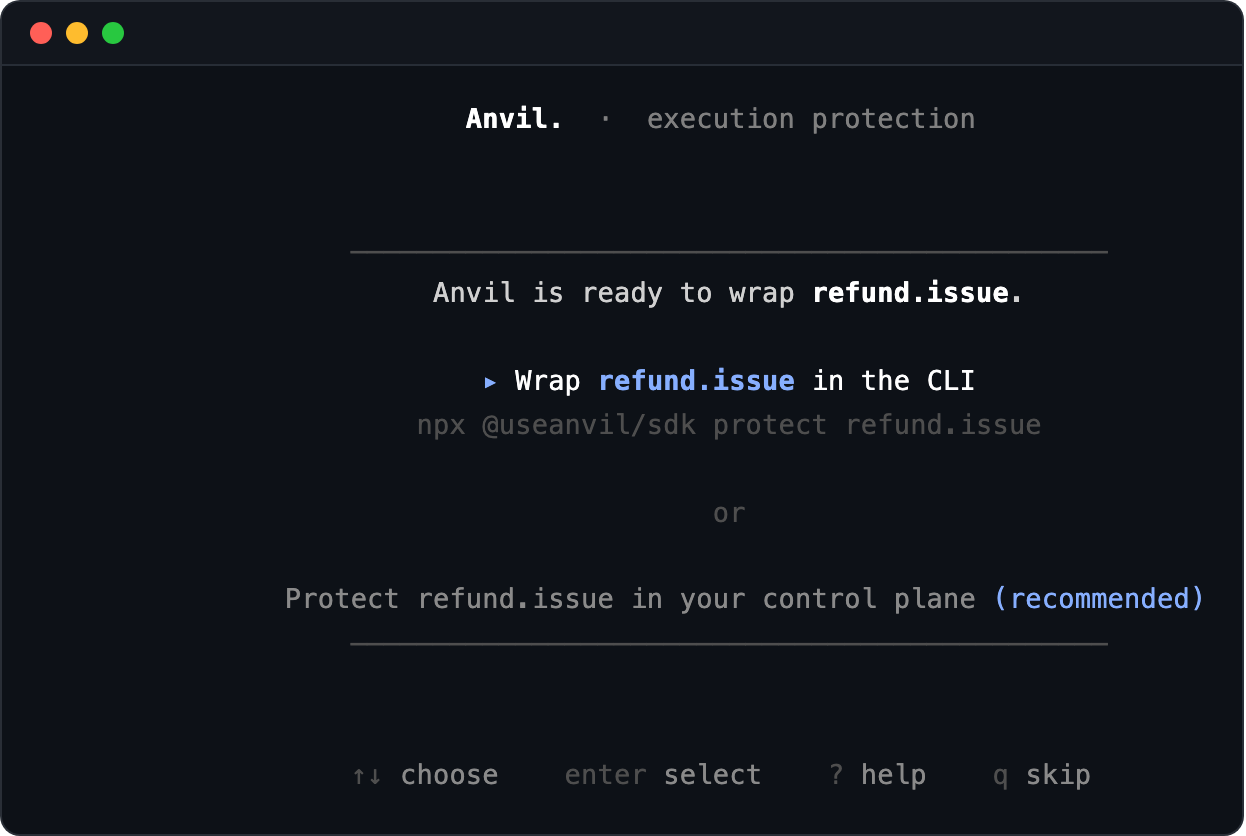
Both choices wrap the call — the difference is where you go next. Wrap … in the CLI does it and hands you back your prompt. Protect … in your control plane does the same wrap, then walks you through the dashboard tour of what it just protected; it's marked recommended because the dashboard is where everything after this happens. (The menu is a first-run courtesy. Run anvil protect again later and it goes straight to work.)
Either way Anvil scans your files, finds the call, previews a one-line change, and writes it. Here's what lands in your source:
// before
const result = await stripe.refunds.create({ payment_intent: order.paymentId, amount: order.cents });

// after
import { wrap, key } from '@useanvil/sdk';

// ⚠ Anvil amount is integer CENTS — args[0].amount is passed through as-is. If this API takes
//   dollars, convert: amount: ({ args }) => Math.round(args[0].amount * 100)
const wrappedRefundIssue = wrap({
  fn: (...args) => stripe.refunds.create(...args),
  key: ({ args }) => key.for('refund.issue', String(args[0].payment_intent)),
  amount: ({ args }) => (args[0] as { amount?: number } | undefined)?.amount,
  action: 'refund.issue',
});

const result = await wrappedRefundIssue({ payment_intent: order.paymentId, amount: order.cents });
Four lines matter:
fn— the risky call you were already making.key— what makes a retry collapse into one call: the durable business id that identifies "this exact refund" across restarts and re-runs.action— the label the control plane groups on.amount— how much this call moves, in integer cents, read fresh at every call. Spend caps and the money-durability signal both read it. Anvil wires it up when your call site plainly carries the amount, and warns when the property is namedamount, because a field holding dollars is the 100× mistake that comment exists to prevent.
If Anvil can't see an amount to wire on a money action, it says so and declines to advertise the enforce flip rather than leaving you with a spend cap that silently never fires. Add one yourself and the offer comes back.
The same rule applies to the key, and it is the one worth reading twice. When Anvil can't find a durable id at your call site it writes key.derive(action, args[0]), which fingerprints the whole payload — so a byte-identical retry dedups and nothing else. If that payload carries anything that changes between attempts (a createdAt, a requestId, a Date, a nonce), every attempt gets a different key and dedup is off for that action, silently. Anvil now says so twice — once in the anvil protect summary, and once at runtime the first time it sees such a payload, naming the field. Both point at the same fix: key.for('<action>', String(args[0].orderId)) — the id that stays the same when the work is retried.
Your .env picks up three lines it didn't have before:
ANVIL_API_KEY=anv_live_...
ANVIL_API_BASE_URL=https://api.anvilcontrol.ai
ANVIL_MODE=ghost
ANVIL_API_KEY is a credential, and anvil protect does not touch your .gitignore. Add .env to it before your next commit if it isn't there already:
grep -qxF '.env' .gitignore 2>/dev/null || echo '.env' >> .gitignoreghost means: every wrapped call runs exactly like it did before, and Anvil records what it would have caught. Nothing is intercepted, held, or blocked.
Two things have to be true for that line to reach your app. The process must read this .env — the SDK loads it only from the directory it starts in, and not at all when NODE_ENV=production, so a production deploy needs those variables set the way you set every other secret. And the wrapped function has to be the one your app actually calls. Both hold for npm run dev in this folder, which is where you are now.
When the wrap finishes, your dashboard opens automatically in a new browser tab. That's your home for everything from here — no more terminal required.
#2. Run your code
Run your app the way you always do. Every call to wrappedRefundIssue(...) now flows through Anvil, gets a verdict, and shows up live in your dashboard's decision log — while behaving identically to the raw call.
That's the whole integration.
No traffic to hand? Call the wrapped function twice with the same durable id. The first is a Pass; the second is a Would catch · duplicate — the fastest honest proof that Anvil is reading your key and would collapse the retry once you enforce.
#Backing it out
One command undoes both halves — the action on your dashboard and the wrapper in your code:
anvil remove refund.issue --dry-run   # prints every file it would touch, writes nothing
anvil remove refund.issue             # off the dashboard, wrapper out of the code
It asks the plane first: if the control plane refuses or can't be reached, your code is left untouched rather than half-unwrapped. Knowing the exit exists is what makes the entrance safe to try.
#3. Your control plane — the home for everything after
If the dashboard didn't open on its own (or you closed the tab), bring it back:
anvil openThat opens your dashboard — this is where you'll spend the rest of your time with Anvil. It's the piece designed to make ghost-mode observations easy to read, easy to act on, and easy to graduate from.
anvil open opens your hosted dashboard at app.anvilcontrol.ai — the workspace this machine is paired with. It never starts a server: if you're running a local plane yourself with anvil serve, and this machine isn't paired to an account, it opens that instead. --hosted forces the hosted one, and --print gives you the URL rather than a browser, which is what you want over SSH.
The first time you run it on a machine that has never paired, it offers to do that first — a browser approval that takes a few seconds. Say no and it just opens the dashboard; it never fails your command over pairing.
Two entries live in the left sidebar, and a third is folded inside one of them:
- Actions — every wrapped action, its current mode (Ghost / Enforce), and its live decision log below. This is the tab you'll open first every time.
- Impact — the aggregate view: what Anvil would have saved, stopped, and proved, rolled up across every action. It is not its own tab — hover Actions and click the caret that fades in to reveal it.
- Policy Studio — the rules that fire on each action, editable in-place.
Your refund.issue row sits under Actions in Ghost mode. Click it and the Decision log unfolds below: one row per real call, each with a verdict pill, a human-readable reason, the amount, and when it fired. Two pills cover ghost — Pass for a call every rule allowed, and Would catch for one enforce would have stopped, whether that's a policy block or a duplicate. The counts along the top filter the list.
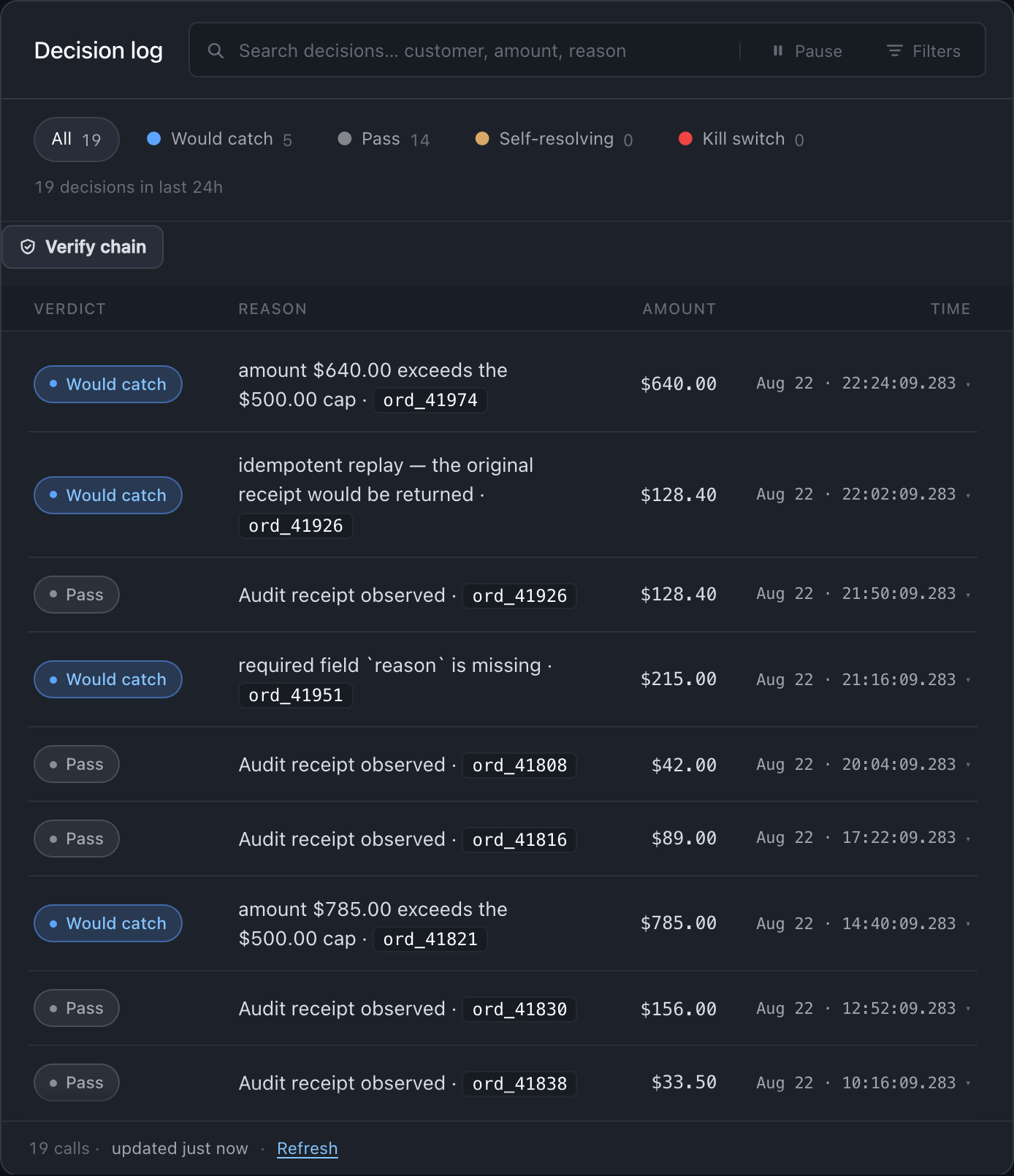
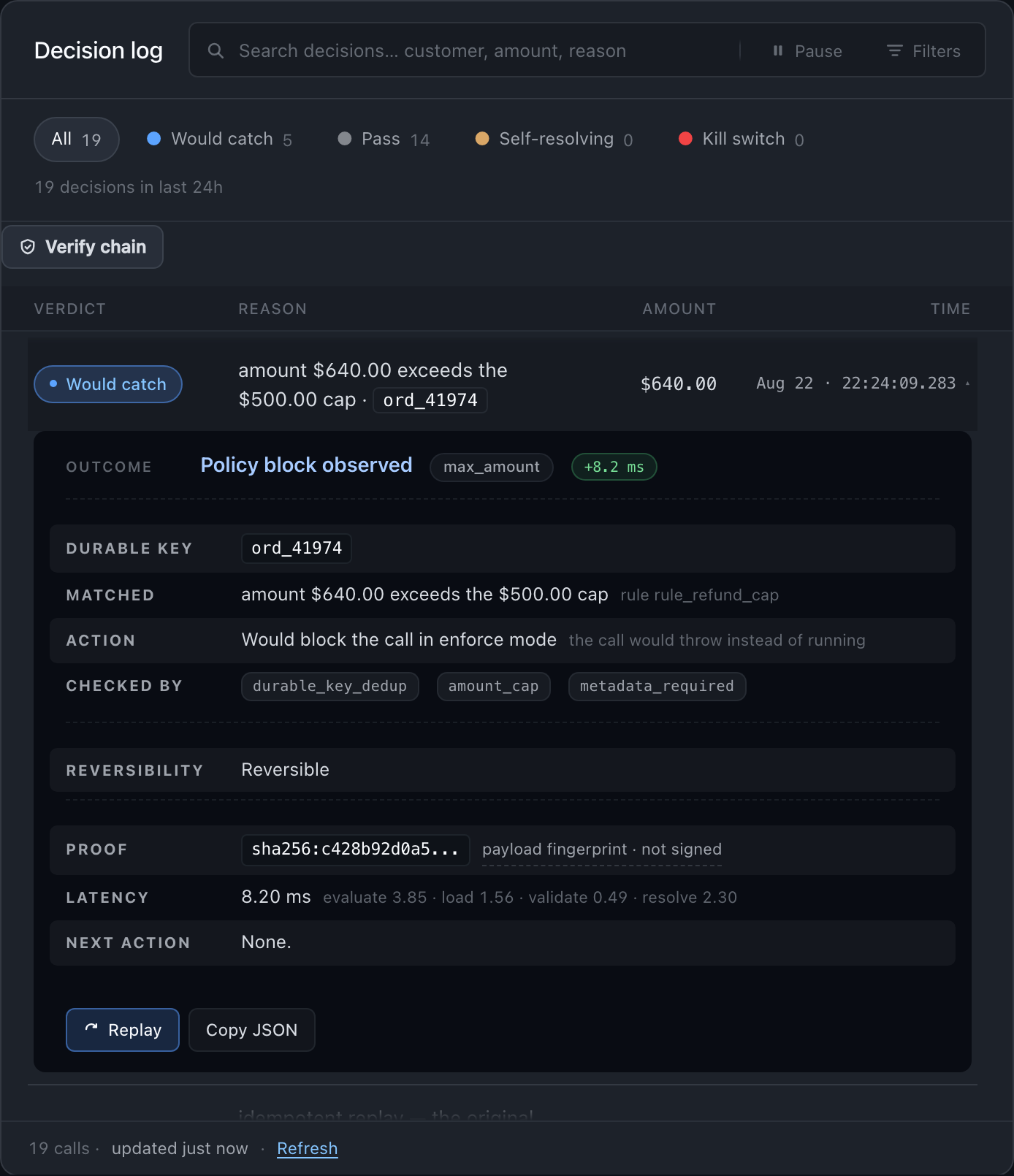
Click any row to expand it. You get the durable key, the rule that matched, what enforce would have done instead of running the call, everything that checked it, the payload fingerprint, and a Replay / Copy JSON button. This is where the "what would Anvil have caught?" question gets answered — visually, filterable, one click deep.
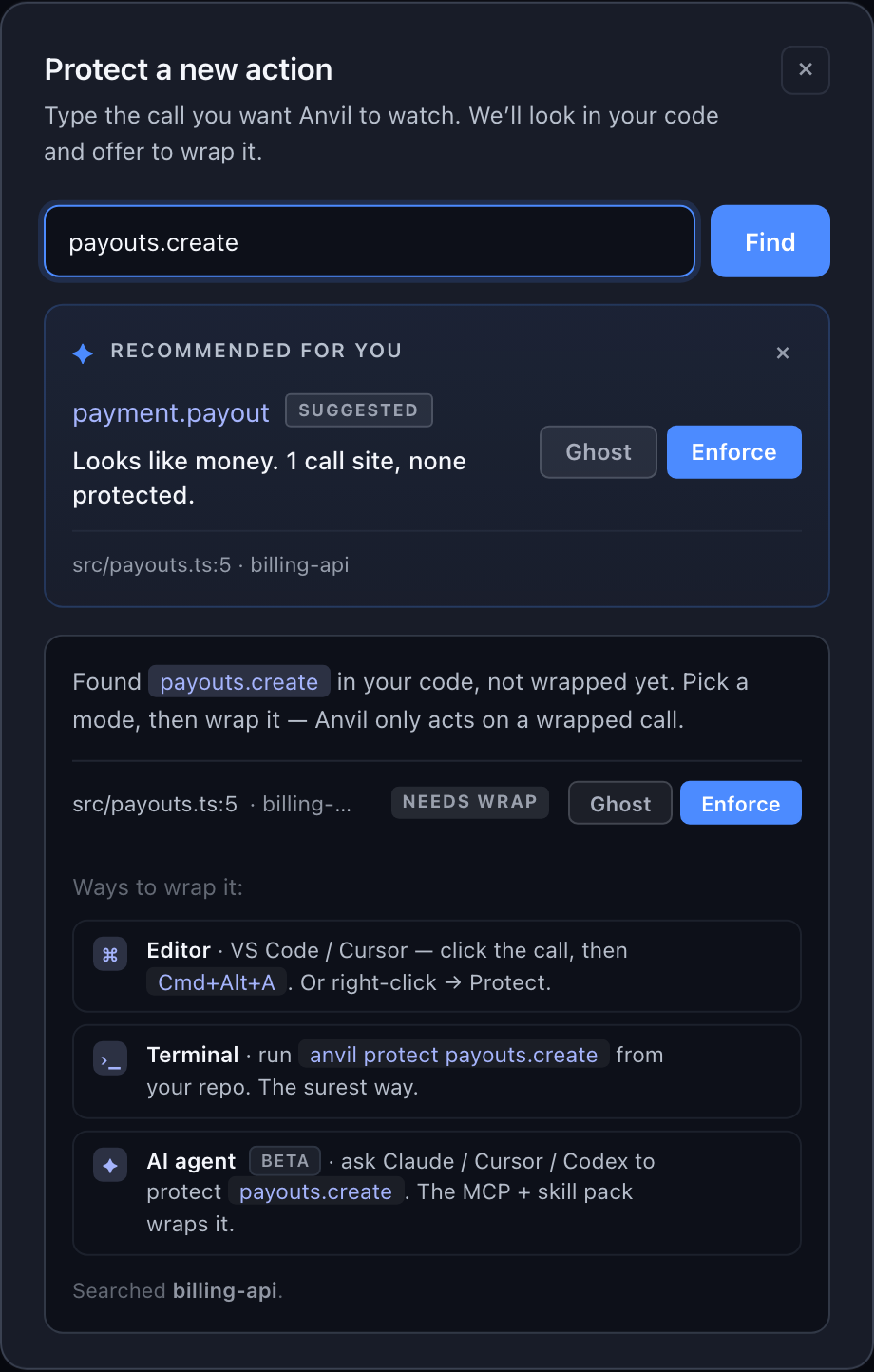
To add another action without leaving the dashboard, click + Protect new at the bottom-right of the left sidebar. Type the call you want watched — payouts.create, subscriptions.cancel — and Anvil searches your code for it. If Anvil is already in that call's path there is nothing to write and you're done. Otherwise it shows you where the call lives and hands you the wrap three ways: open it in your editor, copy the anvil protect command, or copy a prompt for an agent. Most teams add every subsequent action this way.
#4. Watch it in ghost mode
The dashboard is where you want to be for this. Every ghost verdict shows up in the decision log the moment your code fires the wrapped call — no refresh, no polling. Filter by verdict, search by customer or amount, expand any row to see exactly what would have happened and why.
Open the Actions tab → click your refund.issue row → the Decision log streams live below. What to look for:
- Would catch · duplicate — retries or duplicate calls Anvil would have collapsed into one. The expanded row reads "Would return the original receipt in enforce mode."
- Would catch · policy — calls Anvil would have stopped: over a spend cap, missing approval, matching a custom rule. The expanded row reads "Would block the call in enforce mode."
- Pass rows — calls that clear every rule; the baseline your action produces when everything is healthy.
Click any row to see the durable key, the matched rule, the amount, the payload fingerprint, and a Replay button. That's the whole story of a would-have-decision, in one panel.
#If you'd rather see it in a terminal
These read the same ledger the dashboard does — with an ANVIL_API_KEY set they query your workspace's hosted records; otherwise they read whatever store this install is configured with:
anvil audit stats --since 24h
anvil audit query --status blocked --since 24h
--status blocked matches the recorded status — and a ghost call ran, so its record says executed with the hypothetical tucked inside ghost.decision, exactly as the sample below shows. In ghost that query comes back empty, however much Anvil would have caught. anvil audit stats is the ghost roll-up; --status blocked becomes useful the day you flip to enforce.
#Or straight from the raw log
Where a decision is written depends on how this install is configured, and it is worth knowing which one you have:
- Local development (the default). Every decision also writes one JSON line to
./artifacts/anvil-audit.jsonl, and that file is whatanvil auditreads. - With a durable store (
ANVIL_POSTGRES_URL) or a hosted key (ANVIL_API_KEY). The store is the ledger the dashboard,anvil audit, andanvil verifyall read. The JSONL file is a local mirror, and production deployments are told to turn it off entirely withANVIL_LOCAL_SINKS=disabled— at which point there is no file, by design.
A real ghost row, in either place:
{
  "mode": "ghost",
  "action": "refund.issue",
  "status": "executed",
  "amount": 4999,
  "ghost": {
    "decision": "would_dedup",
    "reason": "would_block:duplicate",
    "blockedBy": null,
    "attempts": 0
  },
  "payloadHash": "sha256:396f47…",
  "recordedAt": "2026-07-19T18:22:03.079Z"
}
Two things to notice: top-level status: "executed" — your call really ran — and the hypothetical verdict tucked inside ghost.decision. That's the ghost invariant: Anvil observes, records, never interferes.
#5. You'll know it worked when…
Open the dashboard and check three things:
- /app → Actions shows your action with a ghost badge.
- Decision log under your action has at least one row after you've exercised the call.
- Decision log rows read Pass. That is the healthy result, not a missing one — a Would catch appears only once a rule fires or the same durable key comes back twice.
That's proof end-to-end: your code called it, Anvil observed it, the dashboard rendered it. If any of the three is missing, anvil doctor in the terminal will tell you exactly which link broke — jump to Troubleshooting.
#Adding more actions
Most teams add every action after the first from the dashboard. It's faster, keeps you in one place, and gives you the Ghost / Enforce picker inline.
#From the dashboard: + Protect new
Bottom-right of the left sidebar in /app. Type the action name (e.g. payment.charge) and Anvil searches your code for it, with an inline Ghost / Enforce picker.
The dashboard never edits your repository. Anvil only ever acts on a wrapped call, so when the call is still unwrapped it stages the mode and hands you the wrap three ways — open it in your editor, copy the anvil protect command, or copy a prompt for an agent. That step is real, and it is one click from here. Ways to protect an action covers the other outcomes, including what unsearchable means and why it is not the same answer as "not found".
This is the fastest way to add every action after the first.
#From your editor: VS Code / Cursor extension
For inline wrapping right next to the risky call. Install once:
code   --install-extension anvilcontrol.anvil-protect     # VS Code
cursor --install-extension anvilcontrol.anvil-protect     # Cursor
codium --install-extension anvilcontrol.anvil-protect     # VSCodium
Every risky call gets a Protect with Anvil CodeLens above it. Click, preview the diff, apply — one undoable edit. Keybinding Cmd+Alt+A / Ctrl+Alt+A. Inline decorations show ghost vs enforce state per call, and the extension SSE-syncs with your dashboard — flip an action from ghost to enforce in /app and the icon in your editor updates instantly.
Also available on the VS Code Marketplace and Open VSX.
#From the terminal: another anvil protect
The same command works for any action. The SDK is already installed in your project from step 1, so run it with npx anvil — or npm i -g @useanvil/sdk once, for a bare anvil. Add as many actions as you want; each shows up in the dashboard automatically.
npx anvil protect payment.charge#In code — when the codemod isn't the right fit
Sometimes you're writing new code from scratch, wrapping an agent tool, or standing up a whole workflow — and the codemod isn't the right entry point. Pick the shape that matches. All exports come from the same package, and every one of them shows up in the same dashboard as your first action.
#safe.protect — one inline call
For a single risky call at one site. Pass business fields; Anvil infers the action and dedup key.
import { safe } from '@useanvil/sdk';

await safe.protect({
  orderId: order.id,
  amount:  order.cents,
  execute: async () => stripe.charges.create({ /* ... */ })
});#safe.agent.toolCall — an agent's tool call
Provider-agnostic. stepId is the dedup key across retries in one workflow.
import { safe } from '@useanvil/sdk';

await safe.agent.toolCall({
  workflow: { workflowId: run.id },
  stepId: `verify-customer-${customerId}`,
  toolName: 'kyc.verify',
  execute: async () => persona.verifications.create({ customerId })
});#OpenAI Responses function_call
Feed the model's function_call items in, get protected outputs back. Uses the provider's call_id as the dedup key.
None of the snippets below name a policy. That is deliberate: with no policy in config, the call uses your active policy — the one the dashboard shows and anvil policy edits. Name one only when you have actually created it. A policy that does not resolve is fine in ghost (nothing blocks either way) and fails closed in enforce, so a copied snippet naming a policy you never created turns every tool call into a refusal on the day you flip enforcement on.
import { runOpenAIToolCalls } from '@useanvil/sdk';

const outputs = await runOpenAIToolCalls({
  calls: toolCalls,
  config: { workflowId: run.id },
  tools: {
    refund_order: {
      action: 'refund.issue',
      // Integer CENTS. Without it this money action has no amount, so every spend cap and
      // amount threshold in your policy is dormant — the rule shows as configured in the
      // dashboard and never fires. Anvil warns on a money action with no amount; the warning is
      // easy to scroll past, so wire it here.
      amount: ({ parsedArguments }) => parsedArguments.amountCents,
      execute: async ({ orderId, amountCents }) => stripe.refunds.create({ /* ... */ })
    }
  }
});#Anthropic tool_use blocks
Same shape, for Anthropic — uses tool_use.id as the dedup key.
import { runAnthropicToolUses } from '@useanvil/sdk';

const results = await runAnthropicToolUses({
  toolUses,
  config: { workflowId: run.id },
  tools: {
    create_case: {
      action: 'api.call',
      execute: async ({ orderId }) => zendesk.tickets.create({ /* ... */ })
    }
  }
});#Vercel AI SDK
import { withAnvilGuard } from '@useanvil/sdk/integrations/vercel-ai';

const guarded = withAnvilGuard(tools, { workflowId: run.id });#LangChain / LangGraph
import { anvilToolkit } from '@useanvil/sdk/integrations/langchain';#anvil.workflow(id) — a multi-step run
When several protected calls belong to the same workflow, bind the id once. Retries, tool-call counts, and spend across steps track together server-side and roll up on the dashboard's Impact tab.
import { anvil } from '@useanvil/sdk';

const wf = anvil.workflow(run.id);
await wf.protect({ action: 'kyc.verify',    execute: verifyKyc });
await wf.protect({ action: 'payment.charge', amount: 5000, execute: charge });
const { spendCents, toolCallCount } = await wf.state();#safe.run(fn) / anvil.middleware() — ambient run boundary
The zero-config version of the above. Every safe.protect inside the boundary shares one run id automatically.
import { safe, anvil } from '@useanvil/sdk';

await safe.run(async () => {
  await safe.protect({ orderId, amount, execute: charge });
  await safe.protect({ stepId, toolName, execute: kyc });
});

// or as Express/Connect/Next middleware:
app.use(anvil.middleware());#The three fears
Three things every developer asks before they ship it. Answered here, in one line each:
- Latency. Ghost can never delay your real call: its observation runs on a 50 ms budget (
ANVIL_GHOST_OBSERVATION_TIMEOUT_MS), the pre-call half runs concurrently with your call rather than in front of it, and the durable writes behind it are fire-and-forget. Blow the budget and the observation is recorded as degraded — not your call. Enforce is two round-trips at 5 s each: claim the key, then record the outcome. - If Anvil is down. Once Anvil has told your process an action is in ghost, ghost keeps executing straight through an outage — that's ghost's contract. The one gap is a cold start during an outage: Anvil has never answered for that action, so it has no evidence you're in ghost, and
ANVIL_FAIL_MODEdecides. It defaults toclosed, so the call throws rather than running unobserved. Enforce is fail-closed by that same default. Switch togracefulto hold only money-moving calls over a threshold, oropento pass through. - Data scope. Anvil egresses action name, mode, dedup key, amount, currency, service, any workflow id, and any metadata you supply — not your arguments, not your return values. The one opt-in exception is the
webhook_signaturerule, which needs the raw body and headers to verify a signature. Separately from your calls, the CLI publishes a code map — the file paths and line numbers your protected calls live at, never the source itself — so the dashboard can point at them;ANVIL_NO_CODE_MAP=1turns it off andanvil sync --forgetdeletes it. Decisions land in your own workspace's ledger, and the local./artifacts/anvil-audit.jsonlmirror is yours to keep or turn off.
#Ready for enforce?
When the ghost log shows Anvil catching what you expected, flip one action at a time:
In the dashboard: Actions tab → your action row → toggle Ghost → Enforce. That's the flip.
Your code doesn't change. The verdict does: would_block becomes blocked, and the offending call throws AnvilBlockedError instead of running — it extends AnvilPolicyBlockedError, so a catch written against either name works.
The Ghost → Enforce guide walks through the full flip — how long to observe, what to look for in the log, how to roll back, and how to turn on tamper-evident receipts on the other side.
#Troubleshooting
Grouped by where you got stuck. When in doubt, anvil doctor names the broken link for you.
#The install itself failed
Two different failures land here, and they need opposite fixes. npm ran and refused — that's permissions, and the three fixes below repair it. command not found: npm — npm never ran, because Node.js isn't on this machine at all: install the LTS build (~1 minute) or brew install node@20, reopen your terminal, and start over. More on that case in Nothing ran at all.
npm error code EACCES,syscall mkdir, path/usr/local/lib/node_modules/@useanvil— npm can't write to the global folder. This isn't an Anvil error; nothing of ours has been downloaded yet. The Node.js installer from nodejs.org leaves/usr/local/lib/node_modulesowned byrooton macOS, sonpm install -ganything fails there for a normal user account. Three fixes below, best first. Each one repairs the install rather than working around it, soanvillands on yourPATHwhere the rest of these docs expect it.
- Fix 1 — point npm at a folder you own. Two lines, and the permission problem is gone for every global install, not just ours:
npm config set prefix ~/.npm-global
echo 'export PATH=~/.npm-global/bin:$PATH' >> ~/.zshrc
Reopen your terminal, then re-run npm install -g @useanvil/sdk.
- Fix 2 — install Node through a version manager.
nvm,fnm, or Homebrew put Node under your home directory, and global installs stop needing elevated permission at all. Longer than Fix 1, and it fixes the cause: it also gets you Node 20, the version Anvil is built and tested on.
nvm install 20 && nvm use 20
npm install -g @useanvil/sdk- Fix 3 — clear a root-owned leftover, then install clean. If you see
npm error code EEXIST, "file already exists", an earliersudoinstall left a root-ownedanvillink that npm won't overwrite:
sudo rm -f $(which anvil)
npm install -g @useanvil/sdk
Reach for sudo npm install -g last, if at all. It succeeds once and leaves root-owned files in your npm cache that break ordinary installs later — which is why npm's own guidance is to fix the prefix instead, and why this fix has to exist.
- Still stuck? Run Anvil without installing it. Every command in these docs works with
npx -y @useanvil/sdkin front of it — no install, no permissions, same CLI:
npx -y @useanvil/sdk protect refund.issueYou pay for it in typing: the prefix goes on every command, and each run costs a resolve step the installed binary doesn't. Treat this as the way through today, not the way you work — one of the three fixes above is worth the five minutes.
#Nothing ran at all
command not found: npx(or'npx' is not recognized) — you don't have Node.js installed, so nothing of ours ever ran.npxships inside Node; there is no Anvil code on your machine yet to print a friendlier message. Install Node.js (LTS), reopen your terminal, confirm withnode --version, then re-run. Same fix forzsh: command not found: npm.npm warn EBADENGINE ... required: { node: '>=20.0.0' }— Node is installed but too old. npm prints this as a warning and installs anyway, and the CLI then fails in ways that look like a broken package rather than a version problem. Upgrade first:nvm install 20 && nvm use 20.- Install fails with a native-binary or
esbuilderror — same fix:nvm install 20 && nvm use 20, then re-run. Node 20 is what Anvil is built and tested on.
#Connecting this machine to your account
- "
you@work.comalready has an Anvil workspace — this machine just isn't paired with it yet" — someone (probably you) already created it, from the dashboard or another machine. Say yes to the pairing prompt, or runanvil loginand re-runprotect. No second workspace is created. - The pairing code expired, or the browser never came back — a code is single-use and lives 120 seconds; the terminal waits five minutes. Run
anvil loginagain for a fresh one. No browser here at all?anvil login --pasteworks over SSH, and--token <t>works in CI. - The approval page shows a different code than your terminal — don't approve it. Cancel, and run
anvil loginagain. The two codes match on an honest pairing; comparing them is the entire point of showing them. anvil doctorsays your key was revoked — someone retired it, possibly you during a rotation. Every hosted call is refused until you pair again:anvil login.
#Anvil can't find your call
protectsays "no calls found" — the codemod couldn't match anything. Name the callee exactly —anvil protect refund.issue --call stripe.refunds.create— since a lowercased action label can't match a camelCase call. If it's a Stripe money call, skip the search entirely with the startup flag, which never reads your source.- The dashboard search says "unsearchable" — it couldn't read your project, which is a different answer from "not there." Run
anvil syncfrom the project to refresh where Anvil thinks your code lives.
#Your calls run, but the dashboard is empty
- The action never appears, and both workspaces check out — your app never read the
.env. The SDK loads it only whenNODE_ENVis notproduction, and only from the directory the process starts in, so a service started elsewhere or running as production sees none of it. Check withanvil doctorin that environment, and set the variables there rather than relying on the file. - The action never appears — the other usual cause isn't a broken wrap. Your app reports to whatever
ANVIL_API_KEYis in its environment, and the dashboard shows the workspace you signed into. If the email you typed atanvil protectisn't the one you signed in with, those are two different workspaces. Nothing is lost, and nothing merges on its own: signed in to the account you want to keep, paste the other workspace'sANVIL_API_KEYwhen the dashboard offers to link one — proving you hold the key is what joins them — then put that key in your.envso your app and your dashboard agree. Note thatanvil loginnever rewrites an existing.env, so pairing this machine doesn't move a running service. - The action appears but logs nothing — the wrap registered and your code hasn't exercised it yet, or the wrapped function isn't the one your app actually calls. Check that the call site you wrapped is the live path.
#Everything else
anvil opensays "wrong server on :7446" — something else is holding the port. Stop it, thenanvil serveto start Anvil's control plane cleanly. (anvil opennever starts a server itself.)anvil doctorred-Xs Redis — expected on a fresh hosted install.anvil protectsets up the hosted path, so local Redis isn't needed for ghost mode; you need a reachable one when you self-host enforce with the defaultfailMode=closed.- The intro slideshow keeps reappearing —
rm ~/.anvil/intro-seenresets it.rm ~/.anvil/onboardedis a different switch: it records that you have landed a wrap on this machine, so removing it brings back the first-runanvil protectmenu, not a dashboard banner. - Deeper diagnosis —
anvil doctor --ready-for-trafficruns every check and ends with a Traffic Readiness verdict, exiting non-zero if you aren't ready. Its Account, Approval notifications, and Auto-instrumentation sections answer most "why isn't this doing anything?" questions on their own.