
#Protect from your editor
The moment you understand a risky call is the moment you're looking at it. You know it's a refund, you know which id makes two of them the same refund, and you know what happens if it fires twice. Anvil's VS Code / Cursor extension lets you act on that while it's still true — wrap the call in place, without switching windows and reconstructing the context somewhere else.
code   --install-extension anvilcontrol.anvil-protect     # VS Code
cursor --install-extension anvilcontrol.anvil-protect     # Cursor
codium --install-extension anvilcontrol.anvil-protect # VSCodium#Wrap it where it lives
Open a .ts, .js, .tsx, or .jsx file and every risky call picks up a Protect lens above it — refunds.create(...), charges.create(...), a delete, an agent tool call. For a call the lens did not flag but you know is risky, put your cursor on it and pick Protect with Anvil from the right-click menu. That command never needs the lens to have offered first, which is what covers everything its heuristics miss.
Click either one and Anvil opens a side-by-side diff of the exact edit. Nothing is written until you hit Apply — or Cmd+Alt+A / Ctrl+Alt+A, which skips the preview and lands it straight away. The wrap arrives folded to a single line, so the call still reads like the call, and it's one Cmd+Z from gone.
Applying does three things at once: your source gets the wrap, the action registers on your dashboard, and the call picks up an inline state marker. A new action registers in ghost — Anvil watches and records what it would have caught while your code runs exactly as before, which is why wrapping something in production is a safe thing to do on a Tuesday afternoon. An action the workspace already knows keeps the mode it has, so re-wrapping a call inside an enforcing action never silently downgrades it.
By default the lens only offers itself on money and destructive calls, the two categories it can identify with no false positives. Turn on anvil.includeSideEffects for webhooks, queue publishes, and database writes, or anvil.includeComms for email and SMS.
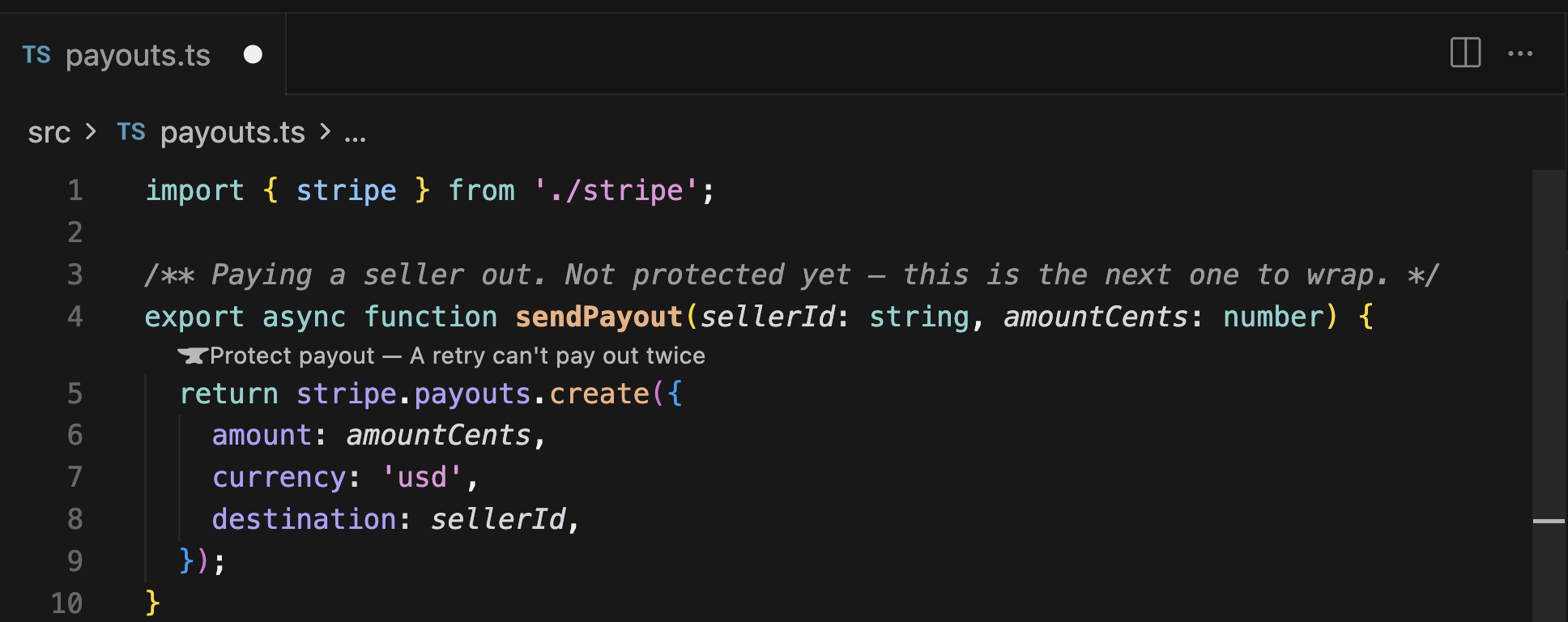
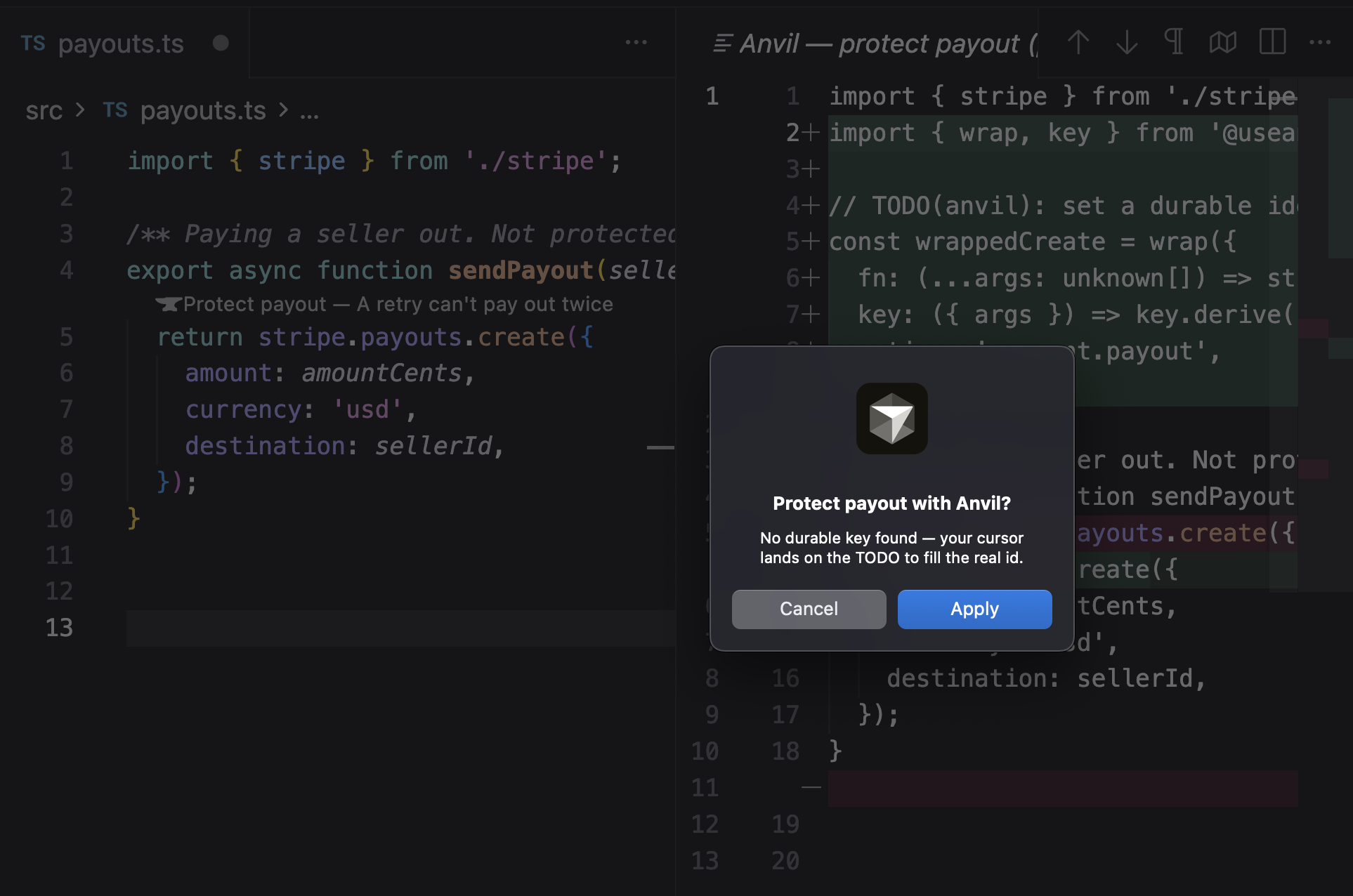
#Fill the key before you enforce
Anvil reads a durable id off the call's first argument — an orderId, a paymentIntentId, a userId. When it finds one the wrap is finished. When it doesn't, it will not guess: it leaves a TODO in the key and lands your cursor on it, which is the moment to fill it in.
That TODO is easy to scroll past, and the consequence is quiet. A wrap whose key is a placeholder still registers, still shows a mode, and still logs decisions — but every attempt looks like a different call, so nothing dedups. Ghost will not tell you, because ghost never dedups anyway. The first time it matters is the retry you flipped to enforce to catch. Fill the key before you flip, and see the durable key for what makes a good one.
#Connect the extension — one click from your dashboard
This is the step almost everyone skips. Your dashboard session lives in your browser, and your editor cannot see it, so the extension needs its own credential. You don't have to go and find one: open your dashboard, click your account menu, choose Connect editor, and pick VS Code, Cursor, or VS Code Insiders. Your editor comes forward and finishes the exchange itself — it claims a short-lived install token, proves which workspace that token belongs to, and only then stores anything. You never see a credential and you never paste one. When it lands, the extension names the workspace you connected as and offers the one next step that's true right then: Show risky calls when the file in front of you has some, Open a sample to try it when it doesn't. What gets stored is a per-workspace, revocable key, held in your OS keychain rather than in settings.json or anything you could commit.
If the link can't reach your editor — a remote SSH window, a machine that hasn't registered the vscode:// scheme, a browser that blocks the handoff — the dashboard shows you the token instead. Run Anvil: Connect to your control plane from the command palette (Cmd+Shift+P) and paste it: an itk_… install token, or an existing anv_live_… workspace key if a project of yours already has one. An install token is short-lived and single-use, so Anvil exchanges it for the workspace key immediately. (Paste works on Anvil Cloud from 0.7.9 — the current release. Before that the extension sent a pasted token to the dashboard origin instead of the guard API and the exchange came back 401 — if yours does, update.)
Running your own control plane? Set anvil.controlPlaneUrl to its origin — one origin serves both the dashboard and the API the editor talks to, so there is only one address to get right: https://your-app.up.railway.app, or http://localhost:7446 for a plane on your machine. Leave it blank for Anvil Cloud. The same Anvil: Connect to your control plane command does both steps in order — it asks for the URL first, then a control token if your plane requires one, then proves the pair with a live read rather than reporting success on a guess. The token goes to your OS keychain, never settings.json. If the origin is plain http:// and not loopback, Anvil warns before sending the token, because it would cross the network in cleartext.
Until you connect, wrapping still edits your file correctly and Anvil says plainly that the rest didn't happen: "payment.refund wrapped — connect Anvil to start watching it. It isn't on a control plane yet, so nothing is observing or enforcing it." The message carries a Connect to Anvil button and a Show details. You never have to work out for yourself why the dashboard is empty.
#Let it write the key into your .env
Right after connecting, the extension offers to add ANVIL_API_KEY to your project's .env. Say yes. The extension and your running app are two different clients of the same control plane: the extension registers actions and changes their modes, but it's your app that calls Anvil when a refund actually runs, and it needs its own key to do that. Skip this and you get the confusing middle state — the action appears in your Actions list, correctly, and then never shows a single decision. It appends ANVIL_API_KEY and ANVIL_API_BASE_URL under a comment saying where they came from, and leaves the rest of the file alone; if a key is already there it doesn't even ask, because silently repointing a project at a different workspace is not a thing a tool should do. Add .env to your .gitignore if it isn't already — that key is a credential.
Check the address it wrote. On Anvil Cloud the two lines should read ANVIL_API_BASE_URL=https://api.anvilcontrol.ai — the guard API, not app.anvilcontrol.ai, which serves the dashboard and answers no /v1/ routes. They are separate services on separate subdomains, and an app pointed at the dashboard fails at the first guarded call rather than at setup. If yours says app., change it to api. and update the extension.
#The state on the line is the state on the plane
Once an action is registered, the wrapped call carries its mode inline: 👻 for ghost, the blue Anvil mark for enforce. The lens above it becomes the verb — Enforce refund? in ghost, Back to ghost? when enforcing. Clicking it asks you to confirm, then writes that change to the control plane exactly as flipping the dashboard toggle would. Enforce is where Anvil starts actually intervening: duplicate calls collapse to one, over-limit calls are refused, and the call throws instead of running.
The icon is never optimism. Both surfaces read the same state from the same place, so your editor and your dashboard agree — and on a hosted workspace the icon deliberately doesn't move until the plane has accepted the change. A refused flip tells you nothing changed, rather than leaving a mode on screen that isn't the one running.
Run 0.7.9 — the current release, and what everything on this page assumes. Before 0.7.4 the extension guessed the mode from local state instead of asking the plane, and could show ghost while the dashboard showed enforce; if yours disagree, that is the fix.
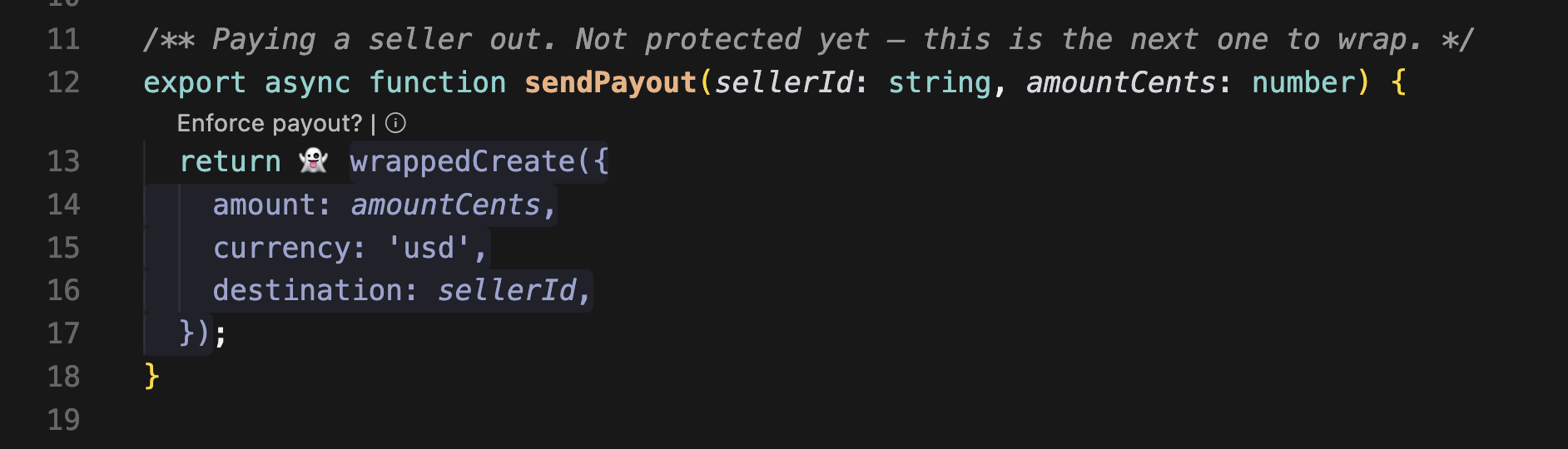
An action switched Off is not ghost, and the line says so. Off is the quietest state in the vocabulary: no emoji, no brand colour, a muted grey with a dotted underline — still legible as Anvil's wrap, without implying it is doing anything. Ghost keeps 👻, because ghost is doing something: watching. If a line loses its ghost and goes grey, the action was switched off on the plane, not broken in your editor.
Where to look afterwards. The Anvil item in your status bar is the standing answer, and it never claims more than it has proved — on Anvil Cloud a connected editor shows a key icon beside Anvil. That is the one place to check when you want to know whether this window is talking to your workspace, without re-running anything.
#When something doesn't land, Anvil says so
The extension will not tell you an action registered when it didn't. The registration is awaited before the success toast appears, so that sentence is true by the time you read it. When it fails you get "<action> wrapped, but not registered" and the cause — the wrap itself already landed in your file either way.
| What failed | What you get | Already retried? |
|---|---|---|
401 — the credential is wrong or was revoked | Connect to Anvil · Show details | No. The same key fails identically, so a spinner would only delay the fix |
5xx — the plane is erroring | Retry · Show details | Yes, twice — 250 ms then 500 ms |
| Timed out or unreachable | Retry · Show details | Yes, twice — 250 ms then 500 ms |
| The plane answered and said no | Show details | No — a retry cannot change the answer |
Show details opens the log in every case. Two other honest refusals worth recognising: the wrap leaves your file untouched and tells you when it finds no matching call in that file, or several with unclear shapes; and a wrap in a project without @useanvil/sdk installed prompts you to add it, since the import it just wrote has to resolve for your code to run.
#Removing an action takes the wrapper back out
Protection comes off the same way it went on. Remove an action — from the dashboard, or with anvil remove <action> — and the extension takes the wrapper out of your files on its next refresh, confirms in a single toast what it cleaned up, and leaves an Undo on it. The unwrap is byte-for-byte: the import, the wrapper, and the comment Anvil added all go, and the line comes back reading exactly as it did before, so a removal doesn't show up in review as a formatting change. It only ever touches paths it found in your own workspace — a path named by the control plane is never enough to make the extension write to disk. If you'd rather do it by hand, turn off anvil.autoRemoveWrapper and the extension will tell you what's stale instead of editing it.
It stops at a file with unsaved changes, and that is the one refusal worth recognising, because it looks like a failure and is the opposite. Unsaved work is the only thing Anvil could destroy that nothing can give back — not even git, because it was never written. So the wrapper stays where it is and you get one message naming the file, with Save and remove on it. Click that, or just save the file yourself: the extension watches for the save and finishes the removal then. Removing it from the editor yourself offers Remove anyway too, which writes the unwrap and leaves your unsaved edits sitting in the buffer on top of it. An uncommitted file is only ever offered Remove anyway — git already holds the previous version, so there is nothing to protect you from.
Removal is a tombstone rather than a delete, which is what makes it safe: the action stops being enforced and leaves your sidebar, its receipts stay where they are, and reviving it restores the mode it had before rather than guessing. That is why a removed action can come back with one click and why a still-wrapped call can never be silently promoted to enforce by having its override thrown away.
#Where the editor fits
Use the editor when you're already in the code and the call is in front of you. It is one of four ways to protect an action — the others being + Protect new in the dashboard, anvil protect <action> in a terminal, and a startup flag that covers common money calls with no code edit at all. They register into the same workspace and show up in the same decision log; the difference is which window you happened to be in, and whether you want the wrap written into your source. Wrap freely — ghost costs you nothing and the log it builds is what tells you which actions are worth enforcing. When one of them has gone boring, the Ghost → Enforce guide walks the flip.