
#Ghost → Enforce, safely
Ghost is optional — Anvil will let you enforce an action that has never run in ghost, and tells you so when you try: "No ghost traffic seen yet for this action — turning it on now means the first live calls are enforced without a rehearsal." This guide is the other path: watch first, flip on evidence, keep the rollback rehearsed. Every flip is action-scoped: one call, one blast radius, one toggle to undo.
This guide takes one action from ghost to enforce end-to-end. Eight stages. Every command is action-scoped, every warning lives where you'll hit it, and rollback is rehearsed before you flip.
#Stage 1 — Pick the first action
Not every wrapped call needs enforce. Ask three questions about each action in your dashboard's Actions tab:
- Does it move money or make something irreversible?
- Is it triggered by an agent, a retry loop, or something you can't fully predict?
- Does a customer or an auditor see the result?
Recommended first pick: your single highest-stakes money mover — a refund, a charge, a payout. High signal in the ghost log, an obvious win the first time enforce catches something, easy to explain to the rest of the team.
Actions you probably don't need enforce for: reads, logs, non-financial tool calls with easy undo. Wrap them if you want the audit trail; you don't need to enforce them.
#Stage 2 — Know what to watch in Ghost
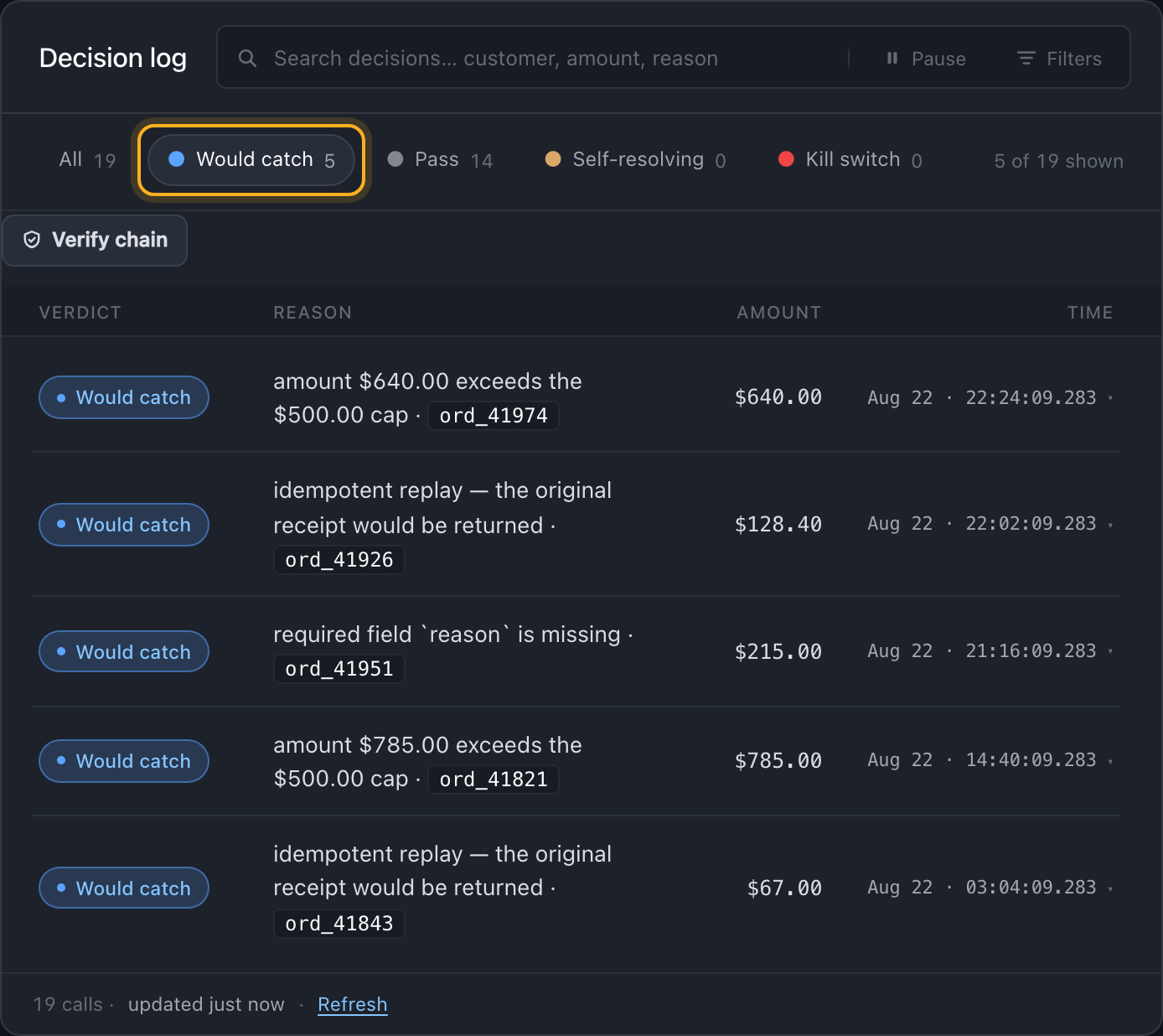
The dashboard is where this happens. Open /app → Actions tab → your action row → Decision log.
Four verdicts, three pills. A duplicate and a policy block share the Would catch pill, because enforce would stop both; the row's reason tells them apart, and the audit record keeps them as separate values:
| On screen | In the record | What it is | What to do |
|---|---|---|---|
| Pass | would_allow | Every rule passed. Baseline. | Silence. Don't chase these. |
| Would catch | would_dedup | A retry Anvil would have collapsed. In ghost it ran anyway. | Confirm — is this what you'd want in prod? Almost always yes. |
| Self-resolving | would_unknown | The call ran and Anvil could not confirm the outcome. | Read these before you flip. In enforce the same shape throws AnvilOutcomeUnknownError, and it needs a reconciliation worker or a person — it will not settle itself. |
| Would catch | would_block | Anvil would have held this call. | The whole point. Read every one. |
Filter to Would catch on your chosen action. That list is what enforce will start catching. Read each one and decide: is this what I'd want blocked? If every answer is yes, you're on track. If any is a surprise — Anvil catching something you didn't mean to block — you're not ready.
If you'd rather work from the terminal:
anvil audit query --status blocked --action refund.issue --since 24h--status blocked matches the recorded status, and a ghost call ran — so its record says executed with the hypothetical in ghost.decision. In ghost that query returns nothing. Use anvil audit stats --since 24h for the ghost roll-up; --status blocked is how you list real enforce blocks after you flip.
#Stage 3 — What'll catch things once you flip
Two layers of coverage. Both work from day one.
#Primitives (out of the box, no config)
Two of these need nothing from you. The third is a rule you write:
- Idempotency (duplicate key) — the
key.for(...)in your wrap. Retries collapse to one call. This is often the whole reason to wrap. - Spend cap — if you've set one in Policy Studio; not on by default.
- New counterparty gate — not a toggle. It is the
new_counterpartyaxis of aconfirmation_gaterule you author in Policy Studio, and it needs a metadata field naming the recipient before it can fire. Seeconfirmation_gate.
#Custom rules (Policy Studio)
More coverage, more work. Open the Policy Studio tab in the dashboard to write:
- Amount limits per action, per service, per counterparty.
- Approval gates (human-in-the-loop for actions over $X, or new counterparties).
- Egress rules (what data can leave, and where to).
Order of operations: enforce with primitives first. Watch enforce for a week. Then add custom rules for anything else you'd want caught. Custom rules written before you've watched enforce tend to over-fire.
#Stage 4 — The readiness gate
Not a calendar. A checklist. Every item is a yes, or you wait.
- Ghost has run against real traffic on this action — not just tests or staging.
- Every
would_blockyou've seen is a call you'd want blocked. Zero surprises. - If this action moves money and your runtime keeps its own receipts — a self-hosted plane, or a process writing locally — durable storage is configured. On Anvil Cloud there is nothing to do here. See Do I need a database?.
-
anvil doctor --ready-for-trafficexits0and ends with "Ready to take risky traffic in ghost mode." (That wording followsANVIL_MODEin the shell you ran it from — not the per-action mode you set in the dashboard. Re-runningdoctorafter a flip and still seeing ghost is expected, and is not a failed flip.) - The team knows this is about to happen (see Stage 6).
- You know how to roll back — and you've done it once (see Stage 5).
Six checkboxes, no partial credit.
The soft signal that pairs with the checklist: the would_block rows have gotten boring. Every one is a known duplicate or a known over-limit, and none of them surprise you anymore. That's the moment. Calendars don't capture readiness; boring would_blocks do.
#Stage 5 — Rehearse the rollback
Before the real flip. While stakes are still zero.
Rollback confidence has to be embodied, not read. Do this once, deliberately, so the toggle isn't unfamiliar under pressure:
- Open /app → Actions tab → your action row.
- Toggle Ghost → Enforce. No reason required for a flip up.
- Watch the badge change. That's the flip — same code, new verdict behavior.
- Toggle Enforce → Ghost. The dashboard prompts you for a 5-character reason (this is real: any downgrade requires one, so nobody quietly weakens a rule without explaining why). Type "rehearsal." The confirm button stays disabled until you do, and it's labelled Weaken to Ghost — the dashboard does not pretend this is a neutral move.
- You're back in Ghost.
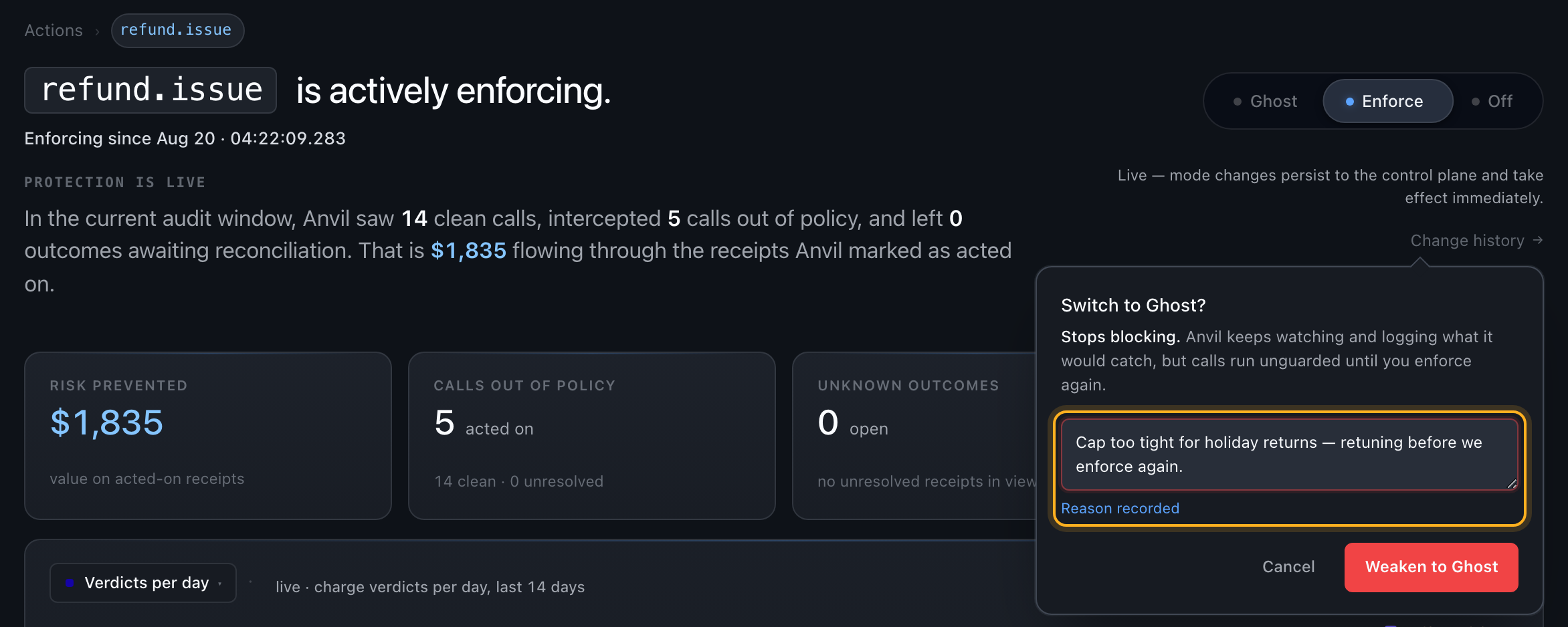
That's it. You've now flipped and un-flipped an action end-to-end. When you do it for real in Stage 6, no part of the motion will be new.
#Stage 6 — The flip
Tell the team first. One line, before you touch anything:
The blast radius of an enforce flip is small but real. Someone on the team is going to see an AnvilPolicyBlockedError in the logs. Better they were expecting it.
Then flip. Three paths — dashboard first, because it's the one you rehearsed:
#Dashboard (recommended)
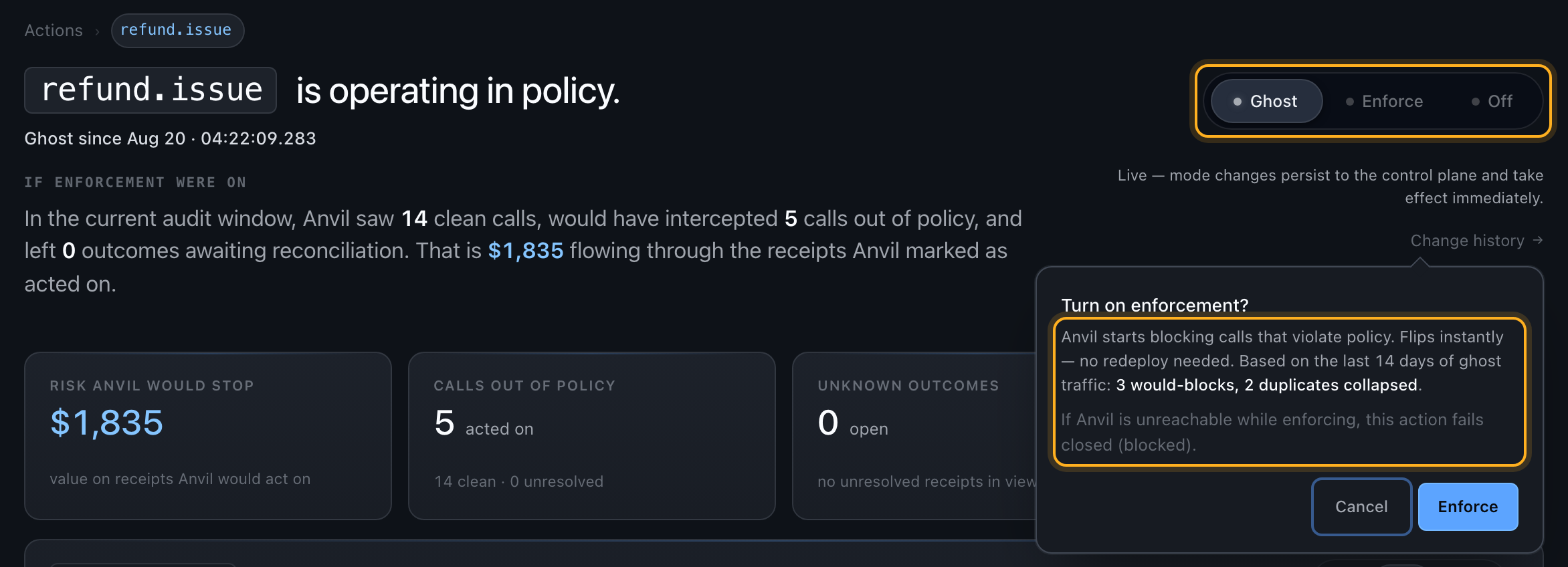
Actions tab → your action row → toggle Ghost → Enforce. Anvil asks once before it takes effect, and the question carries the consequence: how many of this action's own ghost calls your policy would have stopped — over whichever recent window has traffic in it (it tries 14 days, then 7, then 30), or an honest no ghost traffic seen yet for this action if none does, and what happens if Anvil is unreachable while enforcing. No reason is required going up. Confirm and it's live on the next call — no redeploy.
#Terminal
anvil control set-action-mode refund.issue enforceWith ANVIL_API_KEY set — what anvil protect leaves you with — this writes your hosted workspace: the same config the dashboard edits, and the same one enforcement reads. The service argument is optional there, because the plane derives the bucket from the action's namespace, so the three-argument set-action-mode refund refund.issue enforce works too. Neither direction needs a reason on this path — the hosted route records the --reason you pass and does not demand one. (The 5-character rule belongs to the dashboard and to a control plane you run yourself; Stage 8 covers the rollback in full.) Pass one anyway: it is what makes the change answerable in the control history later. To write your own plane instead, point ANVIL_CONTROL_URL (plus ANVIL_CONTROL_TOKEN) at it; to write this machine's local store, pass --local.
#Editor
Anvil: Set enforcement mode (ghost / enforce) in the VS Code or Cursor command palette — same result, from your editor.
What changes the instant you flip: two things, not one. Every call that would have produced a would_block verdict now throws instead of running. And every retry ghost only logged as would_dedup now actually collapses — in ghost the duplicate ran, because ghost executes your call for real, so this is the moment your duplicate-charge protection switches on. Allows behave exactly as they did. The class thrown is AnvilBlockedError — it carries retryable, durableKey and blockReason, and it extends AnvilPolicyBlockedError, so a catch already written against either name keeps working unchanged. Both are exported from @useanvil/sdk.
#Stage 7 — The first 30 minutes
Sit with the dashboard open. This is the ceremony that separates "I flipped it" from "I've seen it work."
#What healthy looks like
- Verdict distribution matches your ghost baseline. Similar allow rate, similar block count, no new
blockedByreasons. - Impact counts real blocks now, not would-blocks. It is not a top-level tab: hover Actions in the left sidebar and click the caret that fades in, which reveals Impact beneath it. The counter that was climbing in ghost is now climbing for real.
- Your app logs show
AnvilBlockedErroron the calls you expected to be blocked — and only those. - The block pill changes word. In ghost it reads Would catch; once a runtime in this action's call path attests it is evaluating rules, the same pill reads Caught. That is the fastest confirmation the flip reached something live — and if it still says Would catch an hour later, it hasn't.
#What "something is off" looks like
- Silence. No allows, no blocks in the decision log. Don't guess at this one — the action's header states
last observed call: N days ago, or says no call has ever been observed. A recent stamp means your traffic is simply quiet and nothing is wrong. An old stamp (or none at all) means Anvil is not in the path: check the wrap is still in place and that the app carrying it has been deployed since you added it. - A spike in blocks. Either a rule is over-firing, or a real incident is in progress. Read the reasons in the decision log before you conclude which.
- A new
blockedByyou didn't see in ghost. Something changed between observation and enforcement. Roll back first, investigate second — go to Stage 8. - Every call throws, and the log fills with
setup_required. This is not your policy — it is your storage. If the action moves money and the runtime making the call cannot write a durable receipt, enforce refuses before anything runs, every time, starting with the first. The reason says so: "this action moves money and receipts are not durable here… No rule of yours rejected this call." SetANVIL_POSTGRES_URLand restart — see Do I need a database?. Rolling back a correct policy will not fix it.
If the first thirty minutes are boring, that's the shape you want. Boring means the ghost log was the truth.
#Stage 8 — Rolling back
One click, one command, no ceremony. Same motion you rehearsed in Stage 5.
#One action
Dashboard: toggle the action back to Ghost. A reason of at least 5 characters is required — write what you actually saw (spike, bugfx, wrong all clear the bar).
CLI:
anvil control set-action-mode refund.issue ghost --reason "rolling back the 2pm flip"With ANVIL_API_KEY set, this writes your hosted workspace — the same config the dashboard edits and the same one enforcement reads. No dashboard, no sign-in, no second credential. (Before v0.4 this command wrote local Redis on a hosted install, which nothing was reading: it printed success while every action kept enforcing. If you are on an older CLI, use the dashboard.)
The service argument is optional on a hosted workspace — the plane derives the bucket from the action's namespace — so set-action-mode refund refund.issue ghost also works if that is in your muscle memory.
#Everything, right now
If something is on fire and you need every action across every service back to ghost immediately:
anvil control kill-switch on --reason "incident 412, holding all execution"That forces ghost on every action, everywhere, until you turn it off (anvil control kill-switch off — no reason needed to restore protection). Use this for real incidents — not for the first would_block that surprised you.
A reason is required to engage it and is written to the append-only control history. It is the first thing an incident review asks for, and the CLI refuses before making the network call so you find out instantly rather than after a round trip.
What it does and does not touch. Your policy, your per-action modes, dedup and receipts are all stored exactly as they are, and lifting the switch restores them precisely — that is what makes this a rollback rather than a revert. But stored is not in force: while the switch is armed every action resolves to ghost regardless of the mode you set on it, so an action reading Enforce in the dashboard is observing, not blocking. That is the whole point of the lever, and it is the distinction to hold onto when someone asks mid-incident whether enforcement is still on.
If your flip appears to do nothing, read the bullets under the result. The line you're looking for is "An Anvil operator has capped this workspace to observe." — or capped_by_operator, if you're reading --json. An Anvil operator can cap a workspace to observe during an incident, and that cap outranks your own setting — deliberately, so an incident response cannot be undone from the outside. Your setting is still stored and takes effect the moment the cap is lifted. Contact support.
Verify it landed — always against the plane, never against what the command printed:
anvil control show --action refund.issueAfter a rollback, the ghost log keeps flowing. You go back to Stage 4 and figure out which checkbox failed — usually #2 (a would_block you missed).
#Done
You know you're through this guide when all of the following are true:
- One action in enforce, with a ghost log baseline behind it.
- Receipts are on (default) — every enforce decision has a durable record in your workspace's ledger, readable from the dashboard or
anvil audit. - You've rolled back at least once — in Stage 5's rehearsal, at minimum — so the toggle isn't new under pressure.
- A rhythm exists for the next action: pick → watch → flip → watch → move on. Each subsequent action takes half the time of the last.
#Where to go next
- Turn on tamper-evident receipts — set
ANVIL_AUDIT_SIGNING_KEY(32+ chars, generate withopenssl rand -hex 32) and every audit record becomes hash-chained. Runanvil verifyto prove your log hasn't been altered. Turn this on when audit or compliance is a real requirement. - Write your first custom rule — Policy Studio tab in the dashboard. Amount caps, approval gates, egress rules. Add these once you've watched enforce for a week and know what else you'd want caught.
- Read Running in Production — the operator page for what changes at enforce, fail-modes, security, and the runbook when something breaks.